Halloween
Join the Halloween event and unlock exclusive rewards!


Easy Sudoku Online
Free Easy Sudoku for beginners
Play Easy Sudoku online when you want a gentle introduction or a relaxed puzzle break. Start a grid above for free, with no download or account required. The aim is to find a reason for each number you enter, one small deduction at a time.
This level focuses on simple placements. You can often make progress by looking at the numbers already on the board, without filling every empty cell with notes. If you are new to the game, the Sudoku rules and beginner techniques explain the essentials.

How to solve your first Sudoku
Fill the empty cells with digits 1 to 9. Each digit must appear exactly once in every row, column and 3×3 box. The starting numbers stay fixed; you do not need arithmetic to solve the puzzle.
1. Find a small gap. Choose a row, column or box with just one or two empty cells and work out which digits are missing.
2. Check all three areas. Before entering a digit, check its row, column and box. A number must satisfy all three constraints.
3. Scan again after placing a number. Your move may rule out an option elsewhere. If a cell is uncertain, leave it and look for a placement you can explain.
Two beginner techniques to try
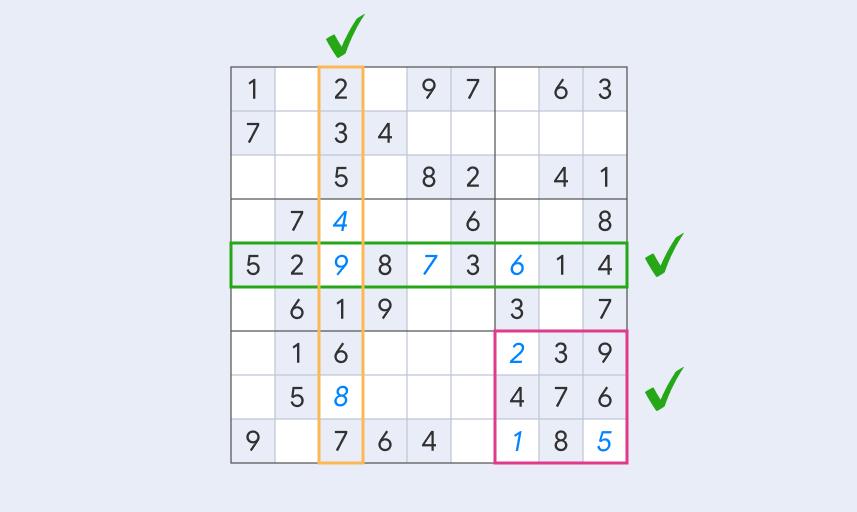
A Naked Single is a cell with only one possible digit. Suppose a cell is missing a number and its row, column and box together already contain every digit except 6. That cell must be 6.
A Hidden Single works the other way around: a digit has only one possible position within a row, column or box. For example, if eight cells in a box are blocked for 4 by existing numbers, the remaining cell must contain 4. These short deductions are the foundation of Easy puzzles.
Use notes and hints when you need them
Try scanning first. When you need to remember several possibilities, use the pencil control for notes mode, select a cell and enter candidate digits. Return to regular input before placing a confirmed number. In Double Input mode, the separate notes row lets you enter candidates directly.
A note records a possibility, not a solution. Keep it up to date as the board changes. If you cannot find another move, the hint control opens guided help; the guide to Sudoku hints explains how to use it for learning.
Choose your next puzzle
Stay on Easy for as long as you enjoy it. When you can explain your placements and find Singles without much help, try Medium Sudoku for more scanning practice. You can also browse Sudoku puzzles by difficulty to compare the available levels.
Prefer a regular puzzle routine? Explore the Daily Challenge. For a paper session, use Print Sudoku below the game to print the current grid.
Easy Sudoku FAQ